Comment Form Themes
How to Customize the Look of Your Comment Box:
For the time being, you must know basic CSS in order to style your comment box. Mozilla Developer Network has tutorials for learning CSS. You can customize the size, color and fonts in your comment box using CSS, just like you can for the rest of your webpage. CSS is code that can go, among other places, in a <style> tag. A good starting point is to download one of these skins and customize it to your needs.
You will need to include the stylesheet in your website's source, using a <link> or <style> tag
CSS Examples
Comment Box Color
Here is an example that makes the comment box fields background to have a yellowish tint.
  <style>
  #HCB_comment_box #hcb_form_content,
  #HCB_comment_box #hcb_form_email,
  #HCB_comment_box #hcb_form_name,
  #HCB_comment_box #hcb_form_website {
    background-color:#ffd;
  }
  </style>
Comment Box Size
This example makes the comment box textarea much larger.
  <style>
  #HCB_comment_box textarea {
    height:400px;
  }
  </style>
Comment Text Color
This example changes the color of the submitted comments to red.
  <style>
  #HCB_comment_box blockquote {
    color:red;
  }
  </style>
Watermark text color
This example changes the color of the watermark labels & entered text to white (for use with a black background for example).
  <style>
  #HCB_comment_box .text-blur {
    color:red;
  }
  #HCB_comment_box .text-focus {
    color:darkred;
  }
  </style>
Submit Button Color
This example changes the color and border of the submit button to green.
  <style>
  #HCB_comment_box .submit {
    background:none; /* Clear twitter bootstrap style. */
    background-color:green;
    border:1px solid darkgreen;
    color: white;
  }
  </style>
Global Text Color
Use the "unstyled" option when copying the code, and use the following CSS:
  <style>
  #HCB_comment_box {
    color:white;
  }
  </style>
Overall Text Size Change
This example makes the comment box textarea text size bigger, and also makes the comment text size bigger.
  <style>
  #HCB_comment_box #hcb_form_content,
  #HCB_comment_box #hcb_form_email,
  #HCB_comment_box #hcb_form_name,
  #HCB_comment_box #hcb_form_website,
  #HCB_comment_box #hcb_submit,
  #HCB_comment_box .author-name,
  #HCB_comment_box .hcb-comment-body,
  #HCB_comment_box .hcb-comment-tb a {
    font-size: 16px; /* Adjust the value depending on wanted text size */
  }
  </style>
Comment Box Text Size Change
This example makes the comment box textarea text size bigger.
  <style>
  #HCB_comment_box #hcb_form_content,
  #HCB_comment_box #hcb_form_email,
  #HCB_comment_box #hcb_form_name,
  #HCB_comment_box #hcb_form_website,
  #HCB_comment_box #hcb_submit {
    font-size: 16px; /* Adjust the value depending on wanted text size */
  }
  </style>
Comment Section Text Size Change
This example makes the Comment section text size bigger.
  <style>
  #HCB_comment_box .author-name,
  #HCB_comment_box .hcb-comment-body,
  #HCB_comment_box .hcb-comment-tb a {
    font-size: 16px; /* Adjust the value depending on wanted text size */
  }
  </style>
Other Style Changes
Use firebug or your browser's web developer tools to find the class or ID of the element you want to change.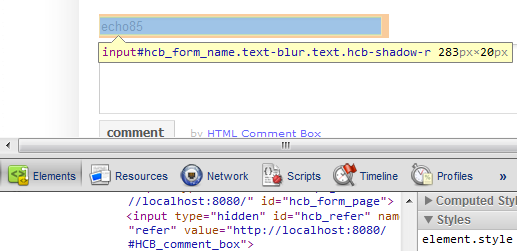
Then, copy that id or class into your CSS, and insert the desired styles in curly braces after it. (if there are multiple classes, like in the image above, just copy one, as shown below.)
  <style>
  input#hcb_form_name {
    color:blue;
    font-size:18px;
    background-color:darkgreen;
  }
  </style>
Content Changes
To customize the text in the comment box form (ie, for different languages) see the advanced options.